Guide
How to transcribe a meeting recording offline on Windows
You can transcribe a saved meeting recording on your Windows computer with a downloaded local speech model. Set up and test the app while online first. For local summaries and chat, you also need a downloaded local AI model. This guide separates local recording processing from installation, downloads and any services you choose to connect.
What offline meeting transcription means
The speech model reads audio on your computer and produces text there. You can use a saved recording from Teams, Zoom, Meet or a recorder; local transcription does not require a bot to join the meeting.
A local transcript does not establish that every later AI stage is local. Check transcription, summary/chat and screen analysis separately. An online meeting platform may already have handled the original recording; local processing describes what you do with the saved file afterward.
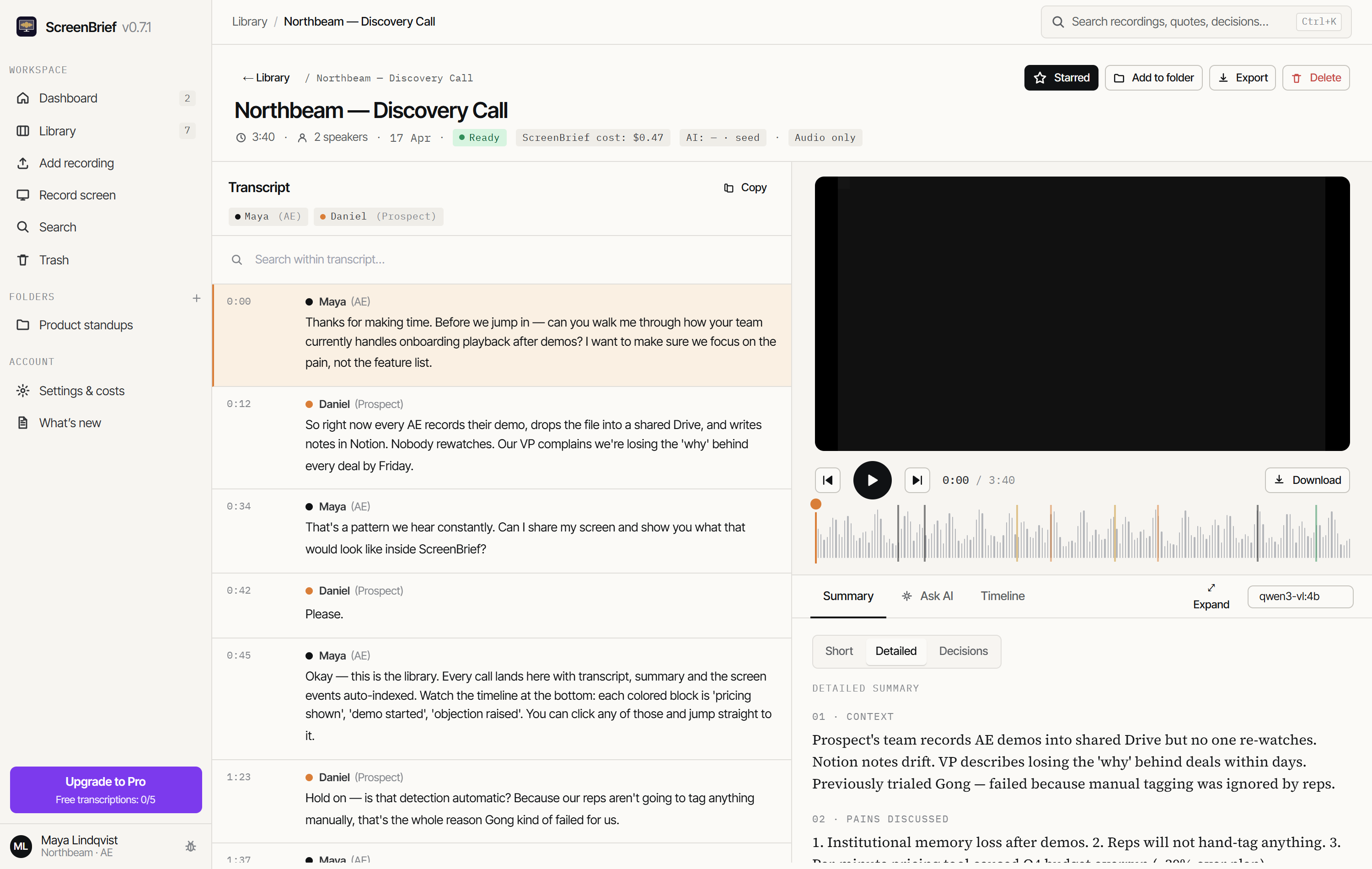
Watch the ScreenBrief demo to see the transcript, summary and answers with citations pointing to the relevant minute of the recording.
Prepare your local transcription setup
- Install ScreenBrief from Microsoft Store on Windows 10/11 x64. The download includes 5 free transcriptions, with no ScreenBrief account needed for local transcription.
- In settings, select local transcription and download the required speech model while you have internet access. Any additional local models needed for processing also need to be available on disk.
- Choose a short audio or video file stored on your computer. For the first test, leave optional screen analysis off.
- Start transcription and open the result. Listen to a few timestamped passages and check names, dates, numbers and speaker labels.
- If you need summaries or chat locally, configure Ollama on the same computer with a downloaded local model, then test it on this recording.
Use the Ollama setup guide for the text AI stage, or the meeting recording import guide to find your saved file.
Which stages keep recording content local?
| Stage | Local configuration | When content goes elsewhere |
|---|---|---|
| Speech to text | A downloaded local speech model | An external transcription API receives audio |
| Summaries and chat | A downloaded local Ollama model on this computer | An external AI provider, Ollama cloud model or remote model server receives text |
| Screen analysis | Disabled, or a suitable local image-capable model | An external vision provider receives the frames required for analysis |
The recording library and transcript database are stored on your disk. Local processing still leaves files on your computer, so handle exports, shared folders and backups according to your own requirements. See the privacy policy for details.
Check the setup before you rely on it offline
Use a non-sensitive test recording. Once installation, downloads and an online test have finished, disconnect from the internet and try the local workflow you plan to use. If you need AI notes, include a summary and a chat question in that test.
- A missing-model download means that stage was not prepared for offline use.
- A provider connection error is a reason to check the selected endpoint and model. A remote server or cloud model needs a network connection.
- If transcription succeeds but optional AI fails, review those stages separately. Do not treat the transcript as evidence that summary or vision processing was local.
This is a practical readiness check, not a network audit or a promise that the application never connects. Installation, downloads, updates, purchasing and connected services can use the internet. Offline availability also depends on having the required models and a usable license or remaining free transcriptions.
Choose a model and measure one short recording
Use the model choices and download sizes shown in your installed version. Smaller models can be easier to run; larger ones may handle difficult speech better, but need more disk space and processing resources. A download size does not tell you how much memory a model will need while running.
For example, test a two-minute excerpt with the people, language and terminology you normally record. Note the processing time and count mistakes in names, numbers and negated sentences. Compare another model on the same excerpt if needed. This gives you a useful comparison on your hardware; it does not guarantee the same speed or accuracy for every recording.
CPU/GPU use depends on the engine, hardware and settings. Read the hardware FAQ and check the app’s processing information rather than assuming every graphics card is supported.
Can I get meeting notes and action items offline too?
Yes, with local transcription and a downloaded local Ollama model on the same computer. After transcription, the text model can produce summaries, decisions and tasks. Verify each important result against its transcript passage and playback.
If a participant says “We will decide the budget later”, the notes should keep the budget open. A fluent summary that supplies a budget, owner or deadline without evidence needs correction. Our local-model benchmark shows why checking extracted tasks matters.
When a different workflow may suit you better
- Very long recordings on a slow computer: test local speed first. An external service may process them faster, but receives the audio and has its own cost and data-handling terms.
- Limited disk space or memory: check model requirements before committing to local processing.
- A requirement for contractual assurances or a formal network audit: a local-processing feature alone does not provide that evidence.
Check local transcription on your own computer
Use one short, non-sensitive recording to check the transcript and processing time. The first 5 transcriptions are free; the local speech model needs no paid provider API key.
Get it from Microsoft StoreDetails of how recording content and connected services are handled: privacy policy.