Practical guide
Turn a screen recording into a transcript, summary, and action items
To transcribe a screen recording on Windows, import the video into ScreenBrief, choose local transcription and open the timestamped transcript. You can then search what was said, ask about a decision and jump back to its source. Start with a short clip to check the audio and transcription quality before processing a full meeting.
What you need before you start
- Windows 10/11 x64 and ScreenBrief from Microsoft Store. The download includes 5 free transcriptions.
- A video file with audible speech, such as an MP4, MOV, MKV or WebM recording. A silent video has no speech to transcribe.
- Internet access to install the app and download the local speech model. Allow disk space for the model and recordings.
- An AI provider and model if you also want summaries, action items or chat. For processing text on the same computer, use local Ollama.
Watch the ScreenBrief demo to see the transcript, summary and answers with citations pointing to the relevant minute of the recording.
How to transcribe an existing screen recording
- Play a short part of the original file. Check that the voices you need are audible, including participants speaking through the computer.
- In ScreenBrief settings, select local transcription. Download the required model before you need to work without an internet connection.
- Choose Add recording and select your video. Choose the language spoken in the recording when you know it.
- For your first test, leave screen analysis off. Start transcription and wait for the transcript to finish; optional AI outputs require their own configured provider.
- Open the transcript. Check names, figures, dates and speaker labels against playback, and edit recognition errors before using the text elsewhere.
Already have a recording from a meeting platform? Use the exported video file. The Teams, Zoom and Meet import guide covers that starting point.
How to capture a new recording with usable audio
ScreenBrief can also record a screen or window. Select the screen and the audio sources before starting: system audio captures sound playing on the computer, while the microphone captures your voice. Make a short test and listen to it before recording a long session.
If only your own voice is audible, check system audio capture. If only the other participants are audible, check the microphone selection. Transcription cannot recover speech that was never recorded.
Find a decision and check the exact moment
For example, suppose a product demo includes a discussion of a blue page design and a Friday deadline. This is an illustrative workflow: search for “blue” or “Friday” in the transcript, or ask the recording chat “Which design did we choose, and who agreed to prepare it?”
Read the cited passage, click its timestamp and listen to that part of the recording. Check whether the speaker agreed to the work or merely suggested it. Keep an unassigned task unassigned; add an owner or deadline only when the source supports it.
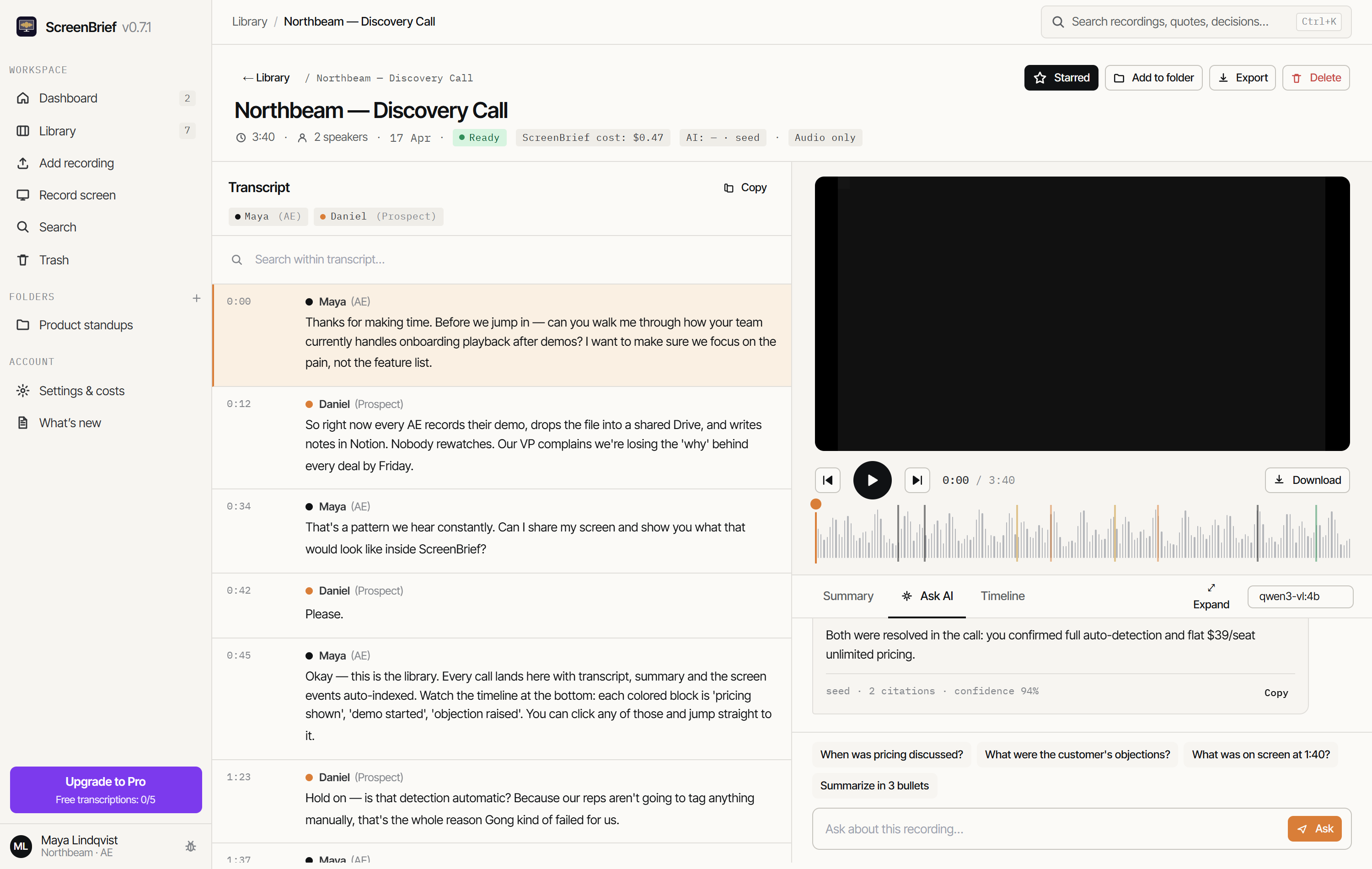
See the guide to finding decisions in recordings for searching across your library.
Choose the output you actually need
| Your goal | Output | What to check |
|---|---|---|
| Search or share the spoken content | Transcript in Markdown or PDF | Names, numbers and speaker labels |
| Add subtitles to the video | SRT or VTT | Wording and timestamps before publishing |
| Follow up after a meeting | Summary, decisions and action items | Evidence for each decision, owner and deadline |
Export the corrected transcript when it is ready. For subtitle files, follow the SRT and VTT guide. Summaries and chat are optional AI stages; the transcript remains useful on its own.
When to enable screen analysis
A transcript captures speech. If someone says “use this setting” while pointing at a control, the spoken words may not identify the control. Screen analysis can add visual events to the timeline, provided you select a provider and model that support images.
Check where that provider processes video frames before enabling it. For a voice-only meeting, you can leave screen analysis off. For a silent demonstration, visual analysis may help, but it does not create a spoken transcript.
Common problems and the next thing to check
- Missing voices: listen to the original file first. If the speech is absent there, check the capture sources and make a new test recording.
- Wrong names or technical terms: check the spoken language setting and compare a different local model on the same short clip. Correct the transcript before exporting.
- A transcript but no summary: check the selected AI provider, model and connection. Local speech recognition does not configure summary AI.
- Slow processing: test a shorter clip and an appropriate model for your hardware. Transcription, speaker separation and optional AI analysis take separate processing time.
Does the video stay on my computer?
Local transcription processes the audio on your computer. Summaries and chat can also run locally with a downloaded Ollama model on the same computer. External transcription providers receive audio; external summary providers receive the text needed for those requests; visual analysis may send frames to the selected provider.
Installation, model downloads and updates can still use the internet. The offline transcription guide explains how to check each stage.
Turn one screen recording into searchable notes
Start with a short clip, check the transcript and follow one citation back to the video. The first 5 transcriptions are free; local transcription needs no paid provider API key.
Get it from Microsoft StoreDetails of how files and models are handled: privacy policy.