Comparison
Otter.ai alternatives that run locally on Windows
If you want meeting transcripts without sending audio to a cloud service or adding a bot to the call, use a desktop app that runs a speech-to-text model such as Whisper on your own PC. On Windows the options include ScreenBrief, Meetily, Buzz, Whisper Desktop, OpenWhispr and Double Scribe; they differ in price, live recording, summaries and setup.
What “local” means, and why it matters
A local app turns speech into text on your own processor or graphics card. The recording does not have to be uploaded to be transcribed, which matters for confidential meetings and slow connections. Most local apps use OpenAI’s open-source Whisper model or NVIDIA’s Parakeet, downloaded once and then run on your PC.
“No bot” is a separate question. A cloud notetaker usually joins the call as an extra participant. A desktop app instead records what your PC hears: your microphone and the system audio of Teams, Zoom or Meet. Nobody sees a bot, so tell the other participants that you are recording. More in local AI meeting notes on Windows.
A local transcript does not make every step local. Summaries and chat can still call an external AI service if you connect one, so check each step on its own; offline meeting transcription on Windows shows how.
Is Otter.ai local?
Otter.ai has a desktop app for Mac and Windows that records meetings without a bot joining the call, and an AI notetaker that can join Zoom, Microsoft Teams and Google Meet for you. Its site does not describe offline use or transcription on your own computer. If processing on your PC is the requirement, pick an app that states it. Otter’s free Basic plan includes 300 transcription minutes a month; its paid plans are priced by region.
Comparison table (checked 28 October 2026)
The six alternatives below can transcribe on your own PC; Otter.ai is listed for reference. Every fact comes from the maker’s website or GitHub page as read on 28 October 2026. A dash (—) means the maker’s site does not say.
| App | Platform | Price | Runs locally | Bot in the call | Account | Live recording / file import | Summaries |
|---|---|---|---|---|---|---|---|
| ScreenBrief | Windows 10/11 (x64) | 5 free transcriptions, then 299 PLN once (≈ 76 USD) or 29 PLN a month (≈ 7.40 USD) | Yes: Whisper on the CPU or GPU (an API provider is optional) | No | No | Screen, one window or audio only; files up to 6 GB | Yes, plus chat that cites the second (Ollama or your own key) |
| Meetily | Windows, macOS, Linux | Community edition free; Pro from $10 per user a month, billed annually | Yes: Whisper or Parakeet | No | No | Zoom, Teams and Meet calls on the device | Yes: a local model or your own key |
| Buzz | Windows, macOS, Linux | Free, open source (MIT) | Yes, offline | No | — | Live microphone; audio and video files, YouTube links | Through plugins |
| Whisper Desktop | 64-bit Windows only | Free, open source (MPL-2.0) | Yes: Direct3D 11 graphics card | No | — | Audio files; live microphone | No: transcript and translation |
| OpenWhispr | Windows, macOS, Linux | Free plan, local models unlimited; Pro $80 per user a year | Your choice: on-device or cloud models | No | — | Calls; audio upload | Yes: local or cloud models |
| Double Scribe | Windows | Free, open source, no subscription | Yes: Whisper on the CPU or GPU | No | No | Live: microphone as “Me”, speakers as “Them” | Transcript only, saved as text |
| Otter.ai (for reference) | Mac and Windows app; iOS, Android, Chrome | Basic free (300 minutes a month); paid plans priced by region | Not described on its site | Optional: AI notetaker joins, or the desktop app records without one | — | Desktop, phone and browser; file import | Yes, plus AI chat |
Prices change; check them on each site before you decide. ScreenBrief’s prices are set in Polish zloty and the dollar amounts are approximations. To try it on one of your own recordings, get ScreenBrief from Microsoft Store.
The alternatives, one by one
Each app solves a slightly different problem. Every description ends with the kind of user it suits best.
ScreenBrief: transcript, summaries and chat that cites the exact second
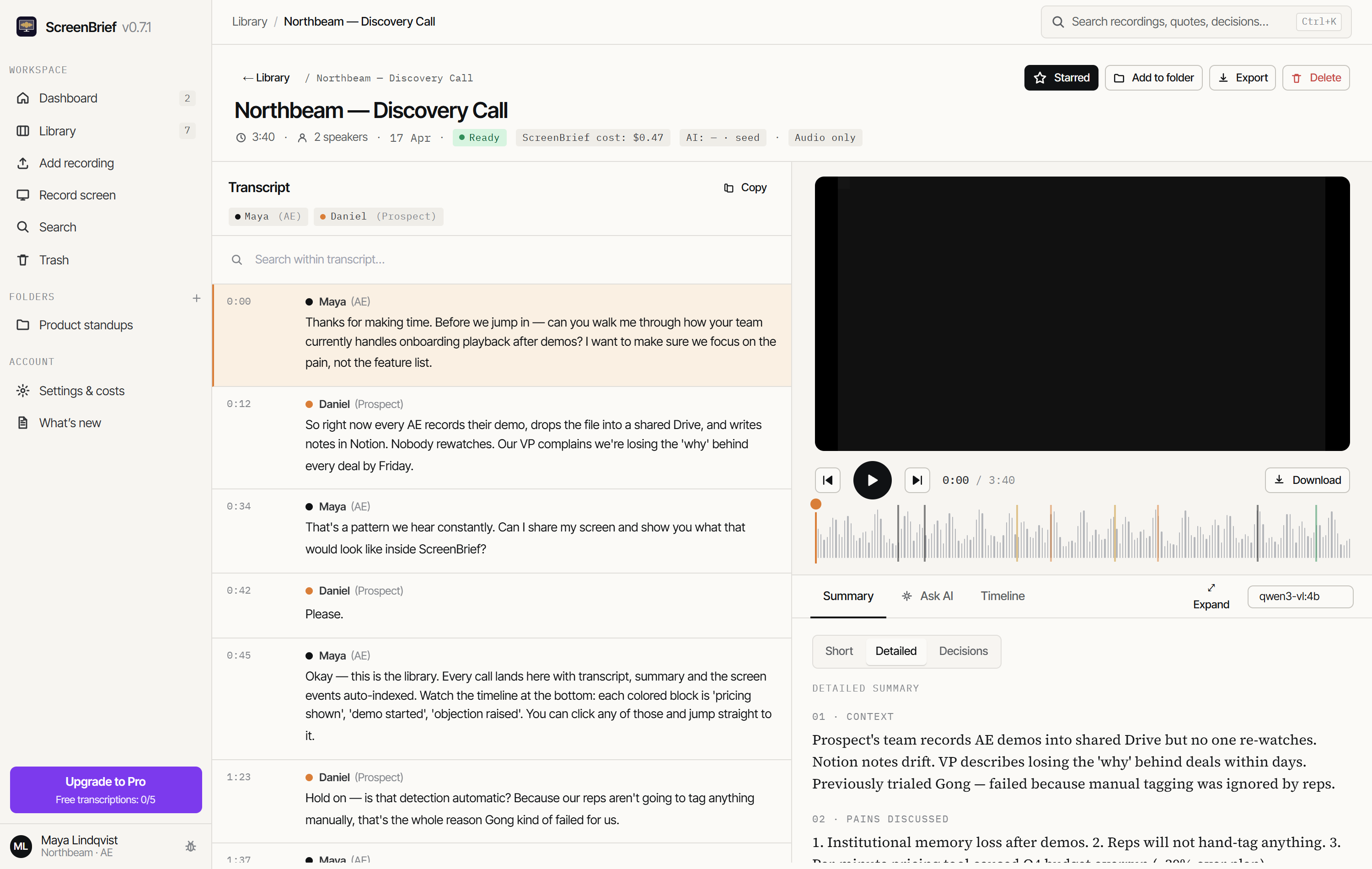
ScreenBrief is a Windows 10 and 11 app from Microsoft Store. It records your screen, one window or audio only, or imports an existing recording from Teams, Zoom or Meet, then transcribes it on your PC with Whisper in about 100 languages. You get speaker labels, a short and a detailed summary, action items, decisions and a chat whose answers cite the second of the recording they come from. Summaries and chat run on local Ollama or on a provider you connect with your own key. There is no account and no bot, and the first 5 transcriptions are free.
Best for: one Windows user who wants notes they can check against the recording.
Meetily: open-source meeting notes for Windows, macOS and Linux
Meetily is an open-source meeting note taker. It captures Zoom, Teams and Meet calls on your device, without a bot or an account, and transcribes them locally with Whisper or Parakeet. Summaries come from a local model or from a provider you choose with your own key. The Community edition is free; Meetily Pro, from $10 per user a month billed annually with a 14-day trial, adds features such as speaker labels. It runs on Windows, macOS and Linux, so a mixed team can use the same tool.
Best for: people who want a free, open-source note taker for live calls on more than one operating system.
Buzz: free offline transcription of files and the microphone
Buzz is a free, open-source (MIT) app that transcribes and translates audio offline on your computer. You can import audio and video files or YouTube links, or transcribe your microphone live, and export the result as text (TXT) or subtitles (SRT, VTT). It can identify speakers, and summaries are available through plugins. Buzz runs on Windows, macOS and Linux; the Windows installer is published on SourceForge.
Best for: free transcripts and subtitles from files you already have, without an internet connection.
Whisper Desktop: lightweight Whisper on a Windows graphics card
Whisper Desktop (Const-me/Whisper on GitHub) is a free, open-source (MPL-2.0) Windows app that runs the Whisper model on the graphics card through Direct3D 11, so it works with any GPU that supports it, not only NVIDIA cards. It transcribes audio files or live capture from a microphone and can also translate. It needs 64-bit Windows and comes as a ZIP from GitHub, with the model file downloaded separately. Its latest release, 1.12.0, dates from July 2023.
Best for: technical users who want a small, portable transcriber and do not need summaries.
OpenWhispr: dictation plus meeting notes, with local or cloud models
OpenWhispr is an open-source (MIT) dictation app for Windows, macOS and Linux that also takes meeting notes without a bot. You choose between models that run on your device and cloud models; it lists more than 100 languages and lets you upload audio. The free plan includes 2,000 words a week and 5 hours of meetings a month, with unlimited use of local models. Pro costs $80 per user a year.
Best for: people who dictate a lot and want meeting notes in the same app.
Double Scribe: free live transcript labelled Me and Them
Double Scribe is a free, open-source Windows app with no subscription and no limits. It transcribes a call live and fully offline with Whisper on your CPU or GPU. Your microphone is labelled “Me” and whatever comes out of your speakers is labelled “Them”, which keeps a two-person conversation easy to follow. It needs no account and saves the transcript as a text file.
Best for: a simple, free live transcript of one-to-one calls.
How to choose
Start from what you need after the meeting, not from the model name. Three questions narrow the list:
- Summaries and action items, or only the transcript? For notes you can act on, look at ScreenBrief, Meetily or OpenWhispr. For a plain transcript or subtitles, Buzz, Whisper Desktop and Double Scribe are enough. To keep summaries on your PC as well, use a local model, for example Ollama on Windows.
- Live calls or files you already have? Meetily, OpenWhispr, Double Scribe and ScreenBrief record calls as they happen. Buzz, Whisper Desktop, OpenWhispr and ScreenBrief also take existing files, for example a Teams, Zoom or Meet recording.
- Store, installer or ZIP? ScreenBrief installs and updates through Microsoft Store. The open-source apps come from their own sites, GitHub or SourceForge, and Whisper Desktop is a ZIP you unpack yourself. If you would rather avoid the command line and model files, read Whisper on Windows without a terminal.
Whichever app you pick, test it on one of your own recordings first: accuracy depends on the microphone, the language and your hardware.
How ScreenBrief works
ScreenBrief turns a meeting recording into a transcript, summaries and answers you can check, in one Windows app:
- Install ScreenBrief from Microsoft Store on Windows 10 or 11 (x64). You do not create an account.
- Record the screen, one window or audio only (microphone and system sound), or import an audio or video file of up to 6 GB.
- Transcribe on your PC with Whisper, on the processor or the graphics card, in about 100 languages. While you record, a live preview shows the transcript.
- Read the short and detailed summary, the action items and the decisions, then ask the chat. Each answer cites the second of the recording it comes from. Summaries and chat use local Ollama or a provider you connect with your own key.
Export the results to Markdown, PDF, SRT, VTT or a calendar file (ICS). The first 5 transcriptions are free; Pro costs 299 PLN once (about 76 USD or 68 EUR) or 29 PLN a month (about 7.40 USD or 6.60 EUR), charged in Polish zloty. See pricing.
Frequently asked questions
Is there a free Otter.ai alternative that works offline?
Yes. Buzz, Whisper Desktop and Double Scribe are free, open source and transcribe offline on your PC. Meetily’s Community edition and OpenWhispr’s free plan with local models cost nothing as well. ScreenBrief gives you 5 free transcriptions, then needs Pro.
Can I transcribe Teams or Zoom meetings without a bot joining?
Yes. A desktop app records your microphone and the system audio of the call, so no extra participant joins. ScreenBrief, Meetily, OpenWhispr and Double Scribe work this way, and Otter.ai’s desktop app can also record without a bot. Tell the other participants that you are recording.
Does local transcription need a GPU?
Not always. ScreenBrief runs Whisper on the processor or on the graphics card, and Double Scribe also works on either. Whisper Desktop needs a graphics card that supports Direct3D 11.
Do these apps work on Mac?
Some do. Meetily, Buzz and OpenWhispr also run on macOS and Linux, and Otter.ai has a Mac app. ScreenBrief, Whisper Desktop and Double Scribe are for Windows only; ScreenBrief needs Windows 10 or 11.
How much does ScreenBrief cost?
The first 5 transcriptions are free. After that, Pro costs 299 PLN once (about 76 USD or 68 EUR) or 29 PLN a month (about 7.40 USD or 6.60 EUR), with the same features and unlimited transcriptions. Prices are set and charged in Polish zloty; the dollar and euro amounts are approximate.
Is ScreenBrief related to screenbrief.de?
No. ScreenBrief, the Windows app at screenbrief.app, is published by Artflow Management in Poland and has no connection with screenbrief.de or any other product with a similar name.
On Windows 10 or 11? Try ScreenBrief free
The first 5 transcriptions are free, with no account and no bot in the call.
Get it from Microsoft Store