Comparison
ScreenBrief vs Fireflies.ai: a cloud notetaker or transcription on your own PC
Fireflies.ai is a cloud meeting assistant: a bot joins the call, or a desktop app records it without one, and Fireflies processes and stores the data on servers in the United States and other countries. Fireflies says it does not use your data for AI training. ScreenBrief is a Windows app that transcribes and labels speakers on your own PC, offline, with no account; Fireflies is ahead on team workspaces, Mac and multilingual calls.
The main difference: where the transcript is made
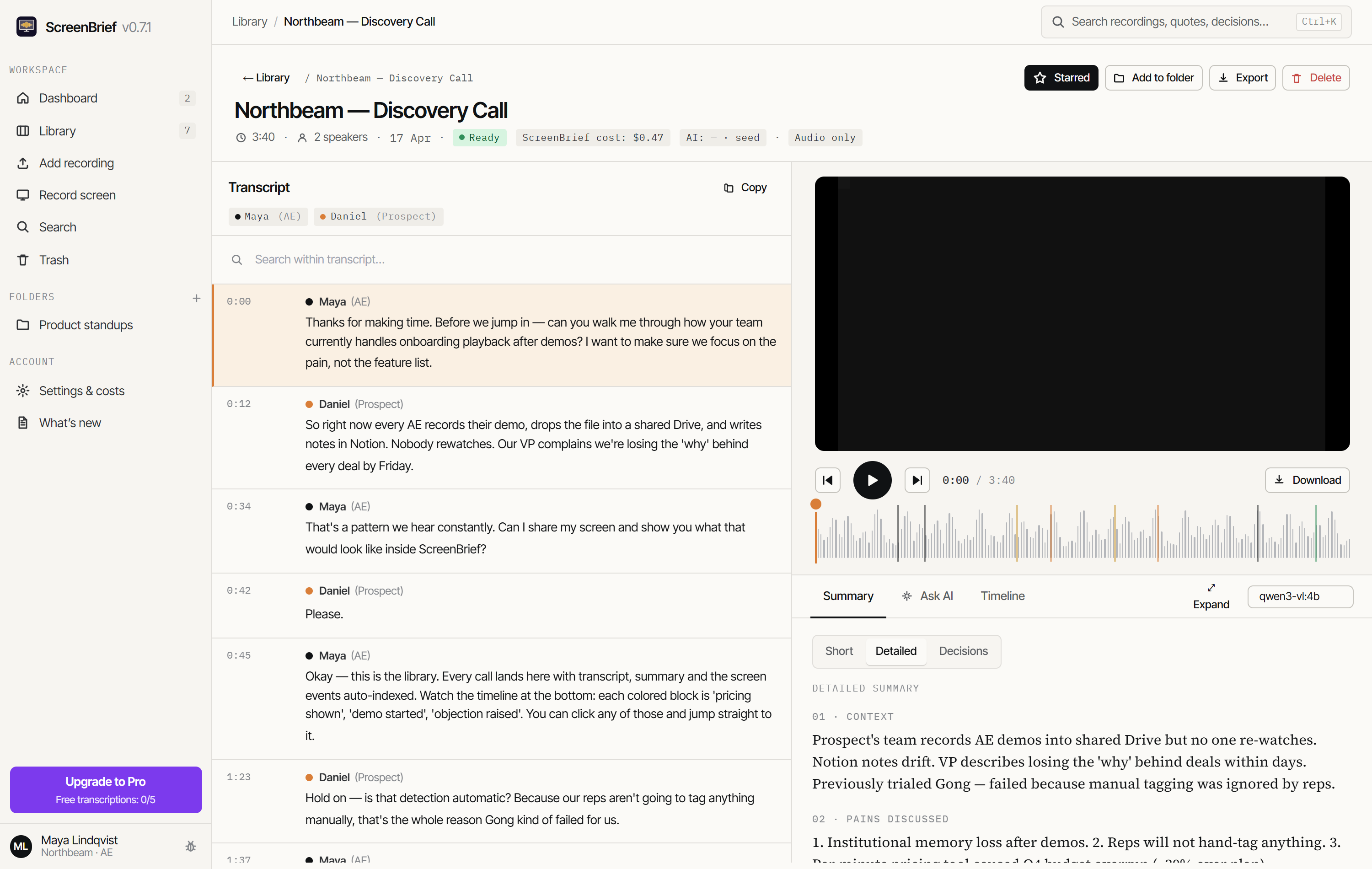
Fireflies works through a cloud account. Its Fireflies Notetaker bot joins the meeting: you invite it or let it join the meetings in your calendar automatically. Without the bot, the Chrome extension or the app for Windows 10+ and macOS 12+ records the call, and participants see a Fireflies indicator. ScreenBrief has no account and no server that receives recordings: the speech model runs on your own PC.
ScreenBrief: stays on your PC
- Recordings, transcripts and notes stay in the app’s folder on your disk.
- Transcription and speaker labels work without internet once the speech model is downloaded.
- AI notes come from local Ollama or, if you choose, from a provider you connect with your own key.
Fireflies.ai: goes to the cloud
- Recordings, transcripts and summaries sit in your Fireflies account, on servers in the US and other countries.
- Storing the data at a location your company picks (Private Storage) is an Enterprise feature.
- Fireflies says it does not train AI on your data, and its vendors keep no meeting content after processing.
Comparison table (checked 9 November 2026)
The Fireflies.ai facts come from its guide, pricing page, security page and privacy policy as read on 9 November 2026; the links are under “Sources”. We do not compare transcription accuracy: results depend on the recording, and our own Fireflies test was too small for a fair conclusion.
| App | Where transcription runs | Bot in the call | Languages | AI training on your data | Account | Price | Platform |
|---|---|---|---|---|---|---|---|
| ScreenBrief | On your PC (Parakeet or Whisper), offline too | No: records the screen and sound, or imports a file | About 100, including Polish | No: recordings never reach the maker | Not needed | 5 free transcriptions, then 299 PLN once (≈ 76 USD) or 29 PLN a month (≈ 7.40 USD) | Windows 10/11 |
| Fireflies.ai | In Fireflies’ cloud (servers in the US and other countries) | Yes: Fireflies Notetaker; without a bot through the Chrome extension or the desktop app, with a visible indicator | 100+; per the pricing page, all but English, Spanish, French, Portuguese and Italian are in beta | No, per its pricing page and privacy policy | Required | Free with limits; Pro $10, Business $19 per seat a month, billed annually; Enterprise $39 | Browser, Windows 10+, macOS 12+ |
Prices change; check them before you decide. Fireflies charges per seat. ScreenBrief Pro is licensed per computer and priced in Polish zloty, so the dollar amounts are approximate.
Privacy and GDPR
Fireflies states GDPR and HIPAA compliance and SOC 2 Type II certification, encrypts notes and transcripts at rest with AES-256, and says it does not use personal information for AI model training and contractually bars its vendors from doing so. Its privacy policy also says Fireflies and its service providers process and store personal information on servers in the United States and other countries; choosing the storage location takes the Enterprise plan. If your organisation is in the European Union, check the data processing agreement and the basis for transfers outside the European Economic Area with your data protection officer before you roll it out.
ScreenBrief keeps recordings, transcripts, notes and the search index on your PC. Its maker runs no server that receives recordings and cannot read them, so transcription alone hands the participants’ voices to no company. If you connect your own key for AI notes, for example for OpenAI or Anthropic, the transcript text goes to that provider on its terms; email addresses and phone numbers are removed from it by default. Notes from local Ollama stay on your PC.
A local app does not remove your GDPR duties: tell participants you are recording and keep recordings only as long as you need them. The privacy policy describes how ScreenBrief handles data.
Offline use and languages
Fireflies processes recordings on its own and its providers’ servers, so the recording has to reach them. Once its speech model is downloaded, ScreenBrief transcribes with no network connection. You still need internet to install it, download models, update and buy Pro; offline meeting transcription on Windows shows how to prepare and test it.
Fireflies transcribes and summarises in 100+ languages, and its Multi-Language Mode handles calls where people switch languages. Its pricing page adds that English is the primary language and that, apart from Spanish, French, Portuguese and Italian, the others are in beta. ScreenBrief transcribes about 100 languages locally, including Polish, and its interface and AI notes are in English or Polish.
When Fireflies.ai is the better choice
Pick Fireflies.ai when:
- Your team wants every meeting in one shared cloud account, with a bot that joins calendar meetings on its own.
- You also work on a Mac or in the browser.
- People switch languages during calls: according to its guide, Multi-Language Mode supports 60+ languages in one conversation.
- Your company requires SOC 2 Type II or HIPAA compliance and wants the data stored at a location it picks (Private Storage on Enterprise).
When ScreenBrief is the better choice
Pick ScreenBrief when:
- Your meetings are in a language Fireflies lists as beta, such as Polish.
- The recording must not leave your computer, for example client calls, hiring interviews or board meetings.
- You work offline or on a poor connection, for example while travelling.
- You want neither a bot in the call nor an account, and your recordings come from several apps or from files on disk.
- You would rather pay once: Pro costs 299 PLN, one time.
Limits: ScreenBrief runs only on Windows 10 and 11 (x64) and has no shared cloud workspace for a team. Local transcription speed depends on your PC, so test it on a short recording first.
Frequently asked questions
Does Fireflies.ai support Polish?
Polish is on the language list in the Fireflies guide. The Fireflies pricing page says, however, that English is the primary language and that, apart from Spanish, French, Portuguese and Italian, the 100+ other languages are in beta (9 November 2026). ScreenBrief transcribes Polish on your own PC.
Does Fireflies train AI on my meetings?
According to its pricing page and privacy policy, Fireflies does not use your data for AI training and contractually bars its vendors from doing so. Recordings and transcripts are still processed and stored on servers in the United States and other countries.
Can Fireflies record without a bot?
Yes. The Chrome extension and the Windows and Mac app record without a bot, and participants see a Fireflies indicator. ScreenBrief does not join the meeting either: it records the screen and system sound or imports a file. Either way, tell participants that you are recording.
Does ScreenBrief work offline?
Yes, once the speech model is downloaded. Transcription and speaker labels then run on your PC without a network, and local AI notes need Ollama with a downloaded model. Installing, downloading models, updating and buying Pro need internet.
How much does ScreenBrief cost compared with Fireflies.ai?
ScreenBrief: 5 free transcriptions, then Pro for 299 PLN once (about 76 USD) or 29 PLN a month (about 7.40 USD), licensed for one computer. Fireflies.ai: Free with limits, Pro $10 and Business $19 per seat a month billed annually, Enterprise $39 (9 November 2026).
Sources
We checked the Fireflies.ai facts on its own pages on 9 November 2026:
- Fireflies.ai: Supported languages (language list, Multi-Language Mode)
- Fireflies.ai: Pricing (plans, prices, beta languages, AI training)
- Fireflies.ai: Privacy Policy (AI training, servers in the US and other countries)
- Fireflies.ai: Security (GDPR, SOC 2 Type II, HIPAA, Private Storage, encryption)
- Fireflies.ai: Desktop App (recording without a bot, supported systems)
If something has changed, write to contact@artflowmanagement.pl and we will update the comparison.
Try it on your own recording
The first 5 transcriptions are free, with no account and no bot in the call. The local speech model needs no API key.
Get it from Microsoft Store